Sunday, December 29, 2013

Yarock – Qt4 Modern Music Player

Yarock is Qt4 Modern Music Player designed to provide an easy and pretty music collection browser based on cover art.Yarock is written in C++ using Qt and Phonon multimedia framework, only for linux platform. Feel free to download, test it and tell me what you think about it. Features include: * Music collection database (SQLite 3) * Browse your local music collection based on cover art * Easy search and filter music collection * Manage favorites item (album, artist) * Play music directly from collection or playqueue * Simple Playqueue * Smart playlist generator * Support mp3,Ogg Vorbis,flac music files (depending on phonon backend) * Support load/save playlist file (m3u, pls, xspf) * Play radio stream (icecast, shoutcast, user stream files) * Mp3Gain tag support for volume normalization * Cover art download (Last.fm/discogs services) * Last Fm scrobbler * Command line interface, Mpris interface * Clean and simple user interface * No GNOME or KDE dependancies

Install Yarock in ubuntu

Open the terminal and run the following commands

sudo add-apt-repository ppa:samrog131/ppa

sudo apt-get update

sudo apt-get install yarock


How to install ZappWM desktop environment in ubuntu

A simple "my own" Desktop for Linux ( designed by vertigini.com.br, not a WM ) with a strong focus on social networks and Cloud Computer users , based on Fluxbox and ROX . For now, we have packages for Debian , Ubuntu and compatible, but with the code , all written in zenity , shell script , it is very easy to port it to any Linux distribution . The goal is to provide an environment that is a very lightweight option for consecrated Unity , Gnome , KDE or XFCE and LXDE and has excellent usability . How we use the ROX desktop, as a basis , the user will have access to advanced features of the Drag'n Drop . Basically , you can drag applications , documents and folders to the panel , desktop and elsewhere . This is a characteristic of ROX . The default shortcuts are focused for the most common applications of Ubuntu / Debian / Mint . But you can customize them to your like . If a shortcut does not work, simply remove the icon or install the corresponding application .

Features

Based in Rox Desktop and Fluxbox Ultra Light Icons and panels Total Drag'n Drop Social World Integration

Is not a new desktop or WM. Its my own desktop packaged for community. Install ZappWM desktop environment in ubuntu First you need to download the .deb package from here . Once you have deb package you can install by double clicking on it. Or If you want to install from the terminal use the following procedure

sudo dpkg -i zappwm_4.2_all.deb

You might see similar to the following error

Selecting previously unselected package zappwm. (Reading database ... 187904 files and directories currently installed.) Unpacking zappwm (from zappwm_4.2_all.deb) ... dpkg: dependency problems prevent configuration of zappwm: zappwm depends on rox-filer; however: Package rox-filer is not installed. zappwm depends on fluxbox; however: Package fluxbox is not installed. zappwm depends on pcmanfm; however: Package pcmanfm is not installed. dpkg: error processing zappwm (--install): dependency problems -- leaving unconfigured Errors were encountered while processing: zappwm

To fix the above error run the following command

sudo apt-get -f install

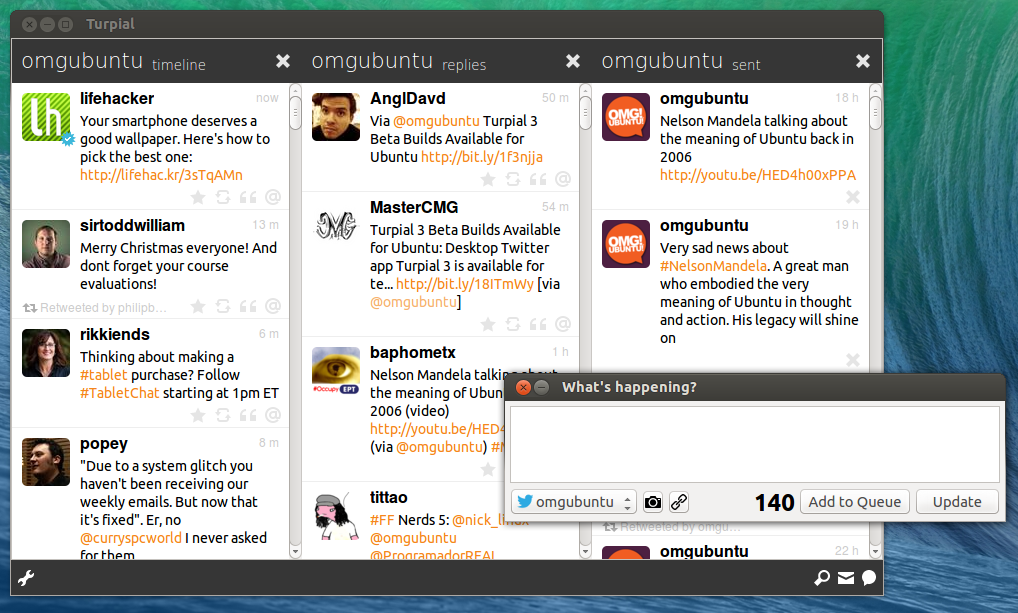
Turpial 3 Beta Builds Available for Ubuntu


Desktop Twitter app Turpial 3 is available for testing on Ubuntu – albeit unofficially. Development builds for Debian have recently been made available. These should install without issue on Ubuntu, giving the bravest amongst the Twittering classes the chance to go hands on with the revamped and retooled app before it’s made more widely available. To get up and running you’ll need to grab both the turpial_3.0_all and python-libturpial installers from the link below. You’ll also need to grab python-jinja2 from the Software Center. Once installed setup is easy enough; you’ll be guided through adding an account and columns after first launch. It uses the official Twitter authentication flow but in an embedded window. As this is a beta quality release don’t expect it to work flawlessly or without issue.

Turpial 3 Beta

Sunday, September 15, 2013

LMMS 0.4.15 landed in Ubuntu 13.10's Ubuntu Software Center

LMMS (Linux MultiMedia Studio) is a solid versatile audio-wise application, useful to create music items, including beats, sound mixes, melodies, etc, essentially, covering a relevant range of an advanced audio-creation spectrum.

Among its features, LMMS comes with:

* beat and bassline editor handy to create beats and basslines * FX mixer with 64 FX channels * song editor * easily-graspable user-friendly Piano-Roll with support for pattern and melody editing * numerous instrument plugins (including AudioFileProcessor, BitInvader, Kicker, Organic, FreeBoy, PatMan, TripleOscillator, Vibed, etc) * full-of-controls interface


Weeks ago, LMMS 0.4.15 was released, bringing several fixes and optimizations, under-the-hood improvements strengthening the 0.4.x series, improvements such as: * chords-related fixes * fixed freezes when forwarding MIDI events to instruments * enhancements to plugins (accurately retaining custom track names, fixed crashes of reversed samples, etc) * refreshed used Qt version LMMS 0.4.15 landed in Ubuntu 13.10's Ubuntu Software Center, therefore, users are able to install the latest release of LMMS directly via the warmth of Ubuntu Software Center.

Thursday, September 12, 2013

Final Term updated with interesting command completion and enriched Unity launcher quicklist

Final Term is a powerful, optimized and worked-on-detail terminal emulator that takes the terminal experience to a completely new level, where interactions, polished animations, intelligent features and support are first class citizens. Among its features, Final Term comes by default with smart command completion, semantic text menus, 8 / 16 / 256 colors, accurate precise window resizing, on-demand drop-down look, beautiful themes, etc, essentially, a modern terminal emulator. By simply launching Final Term, the user is to immediately notice its polish and finely-tuned elements, as in the case of the animated cursor imprinting an energetic robot-like elegant feel into the fancy terminal.


Final Term has been updated to another meaningful release, introducing user-friendly command completion and enhanced desktop integration. Final Term allows the user to select commands via a drop-down menu, typing (for example) sudo apt- summons a drop-down where command completions are exposed and clickable; selecting a command is as simple as utilizing the keyboard's up and down arrows and hitting the Enter key, action that both completes the command and executes the command (one action). The newly-updated Final Term introduces passive command completion, meaning: * typing the (for example) sudo apt- command, summons the drop-down with suggested command completions * yet, as additonal, pressing on the keyboard's right arrow, adds the complete now-editable command to the terminal, without executing it Basically, the passive command completion allows the user to modify certain parameters of the command, like for example, modifying the name of the to-be-installed packages, pressing on the right arrow, allows the user to modify and adjust the command accordingly.


Moreover, the new version enriches its desktop integration by adding a new entry to its Unity launcher quicklist; right-clicking now on Final Term's Unity launcher icon, presents a new Open a New Window entry, clicking on it, opens another Final Term window. The mentioned features come to further solidify and improve Final Term, aligning the handy versatile terminal to the desktop, as well as permitting an improved more hassle-free command management. How do we install Final Term 0.1? Add the following daily (probably unstable) PPA (Ubuntu 12.04, Ubuntu 12.10, Ubuntu 13.04, Ubuntu 13.10)

sudo add-apt-repository ppa:versable/finalterm-daily

sudo apt-get update

sudo apt-get install finalterm

At the moment, Final Term is work in progress.

Friday, August 23, 2013

Latest Stable Chrome Build Has a New ‘Reset to Default’ Option Available

chrome

If your Chrome browser reaches a point where it no longer works well, then that usually means uninstalling and reinstalling it in order to get back the fresh optimal performance you love. But things just got a lot simpler this week! The latest stable build of Chrome comes with a new ‘Reset to Default’ option that lets you return your browser to its original ‘shiny new condition’ with just a click of a button. To access the new feature, just go to Settings, scroll down to the Advanced Settings section and expand it, then scroll to the Reset Browser Settings option located all the way at the bottom. Once you click on the Reset Browser Settings Button, all tweaks and personalization except for themes, bookmarks, and apps will be wiped out, leaving you with a fresh browser once again.

Monday, August 12, 2013

TrueCrypt With Ubuntu AppIndicator PPA

Ubuntu doesn't support tray icons by default and further more, the systray whitelist, which could be used to get applications to use the systray, has been removed with Ubuntu 13.04. This is pretty bad for TrueCrypt, an open source disk encryption application that still uses a tray icon and doesn't come with an Ubuntu AppIndicator, because you can't bring the mount/dismount dialog up once you close the main window unless you kill the application (it closes to the tray which isn't visible).


For this reason, Stefan Sundin has created an Ubuntu PPA for TrueCrypt which has been patched to use an Ubuntu AppIndicator instead of a tray icon.

Install TrueCrypt with AppIndicator instead of tray icon in Ubuntu

To install TrueCrypt with Ubuntu AppIndicator support (PPA available for Ubuntu 13.04, 12.10 and 12.04), use the commands below in a terminal: sudo add-apt-repository ppa:stefansundin/truecrypt sudo apt-get update sudo apt-get install truecrypt

The AppIndicator exits when hiding (closing) the main TrueCrypt window - to fix this, open the TrueCrypt preferences and on the "Background Task" tab, uncheck "Exit when there are no mounted volumes".